Scenario
A scenario is a virtual data context, saved locally on your computer, in which MxOps save values that are useful for MxOps execution. The data saved consist mainly of:
accounts id
accounts access method (pem, ledger, …)
ABIs linked to smart-contracts
smart-contract queries and calls results
tokens
custom data saved by the user
This means than whenever you or MxOps save a value in a scenario, it is accessible at anytime in this scenario even if you restart your computer. (unless you decide to delete or overwrite it).
The main idea behind scenarios is to allow you to easily switch context at anytime, without data loss.
Example
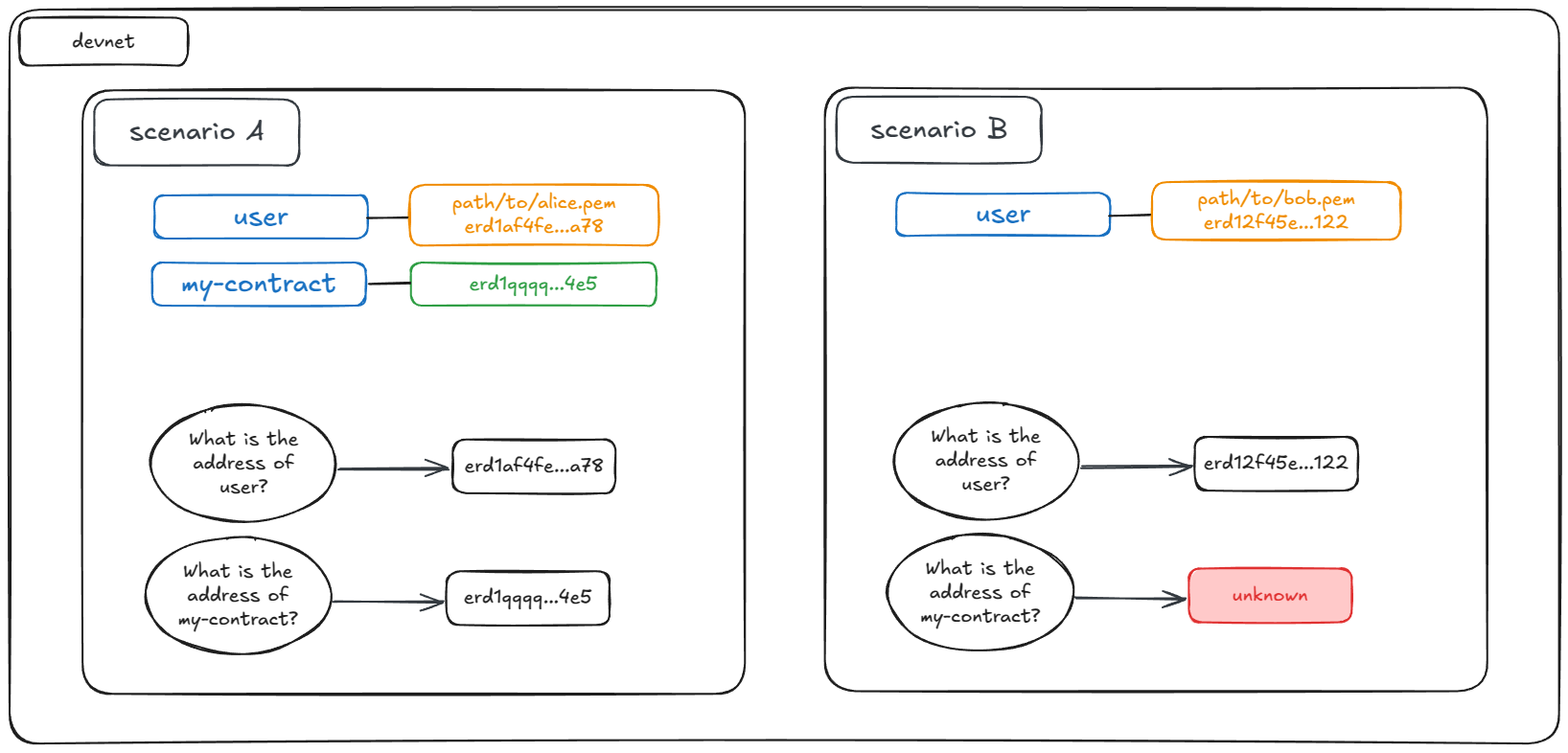
On devnet you create two scenarios, in which you do the following:
Scenario A:
assign the account id
userto the wallet alice.pemmake alice deploy a new contract that you will call
my-contract
Scenario B:
assign the account id
userto the wallet bob.pem
The account id user does not cause any conflict because the scenarios are completely separated. Each account id user refer to a different account.
This allows you to create generic scenes, but to apply them differently depending on the scenario in which you execute them.
Uniqueness
Scenarios are uniquely defined by a name and a network (ex: my-scenario on devnet)
An account id can only be assigned once in a scenario
A token id can only be assigned once in a scenario
Some illustrations:
you can deploy the same contract code under different ids in the same scenario (ex: different pools for a DEX)
you can deploy the same contract code under the same id but under different scenarios (ex: when executing several test plans)
you can deploy the same contract code under the same id and under the same scenario but on different networks (ex: testing a deployment plan on devnet and then applying it on mainnet)
Warning
If you try to assign twice the same account id within the same scenario and network, MxOps will throw an error.
Note
To make it easier for the user, if you execute several times a scene that defines accounts ids or access, MxOps will just ignore it. It will only raise an error if the new definitions are not consistent with the initial definitions. (For example an error is raised when a user defines the same account id but for two different addresses).
Persistence
As stated previously, the scenarios data is saved locally on your computer. This means that you can reuse a scenario and execute new scenes in it. This is very useful for incremental executions (deploy, upgrade…) or recurrent tasks (complex claim/compound cycles for example).
Location
By default, scenarios data is saved locally in the app folder of your computer (the exact path depends on your OS). This means that wherever you activate MxOps, you will write and read at the same place. You should watch out for name collision between your projects if you have several.
A good practice is to be descriptive in your scenario names: prefer my_project_deployment instead of something too generic like deployment.
You can also create a custom MxOps config for each of your project to separate the data (you may want to version track with git mainnet data for example). Refer to the config chapter for this.
Commands
scenario can be accessed through the data command of MxOps.
Below sections show some command examples. You can always use mxops data --help to get more information.
List Existing Scenario
To print out all the existing scenario on a specified network:
mxops data get -n <network> -l
Print Full Scenario Data
To print out all the existing data for a scenario on a specified network:
mxops data get -n <network> -s <scenario>
Evaluate Expression
You can ask Mxops to evaluate an expression in the context of a given scenario.
mxops data get -n <network> -s <scenario> <expression>
The expression can take full advantage of all the features of the smart-values.
For example, If you want to retrieve the address of the contract you just deployed with the contract id my-contract on devnet in the scenario my-scenario, use the command below:
mxops data get -n devnet -s my-scenario "%my-contract.address"
The output of this command is printed, meaning that you can reuse it in your bash scripts for example:
SC_ADDRESS=$(mxops data get -n devnet -s my-scenario "%my-contract.address")
echo "result: $SC_ADRESS"
Delete Scenario
To delete all the data from a scenario
mxops data delete -n <network> -s <scenario>
Clone Scenario
To clone the data of a scenario to another:
mxops data clone -n <network> -s <source_scenario> -d <destination_scenario>
Warning
All the data of the destination scenario, including its checkpoints, will be deleted.
Checkpoints
Sometimes you need to deploy numerous tokens and external contracts to setup your testing environment. For example when you project relies on xExchange and you want to fully replicate the tokens, pools, farms and others. Such setup takes a long time to execute, even when it is automated as most of the transactions have to be made sequentially.
To address this, MxOps has the concept of scenario checkpoints. It allows you to save the data of a scenario in its current state so that you won’t need to repeat certain actions.
Here is an example use-case:
Execute some scenes that create some tokens
Create a checkpoint named
tokens_checkpointExecute some scenes that setup some external contracts (ex a wrapper-sc)
Create a checkpoint named
external_contracts_checkpointExecute the scenes that test your smart-contracts
Revert to checkpoint
tokens_checkpointorexternal_contracts_checkpointdepending on your needs so that you can use the tokens or the external contracts without creating/deploying them again.
Create a Checkpoint
To save the current state of a scenario as a checkpoint.
mxops data checkpoint -n <network> -s <scenario> -c <checkpoint> -a create
Load a Checkpoint
Overwrite the current state of a scenario with the data of a checkpoint.
mxops data checkpoint -n <network> -s <scenario> -c <checkpoint> -a load
Warning
Checkpoint only save the local data of a scenario, it does not perform any blockchain operation: It can not revert a smart-contract in a certain state. If your scenario needs every contracts to be as new, you will need to redeploy them each time.