Introduction

MxOps is a tool created to facilitate and automate MultiversX interactions: be it smart contracts deployments, calls, queries or just simple transfers. Inspired from DevOps tools, it aims to ease and make reproducible any set of interactions with the blockchain.
MxOps is built to be especially useful in these situations:
smart-contract deployment automation
on-chain integration tests (chain simulator, localnet, testnet or devnet)
smart-contract interaction automation
The vision of MxOps is that interacting with the blockchain should be straight forward and that even non-technical users should be able to interact with the blockchain at will. For this reason, MxOps will handle all the hassle for you so that you can focus on the core of your activities.
How does it works?
MxOps is built in python, on top of mx-sdk-py, but you don’t need to know python nor to be a programmer to be able to benefit from MxOps. Indeed, you only have to write yaml files (aka formated text files) to describe what you want to to.
Snippets
To give you an idea of how simple it is to use MxOps, you will find below a few yaml snippets for some of its capacities.
Token Issuance
Here, MxOps is used to issue a fungible token from an account named by the user as alice:
  - type: FungibleIssue
    sender: alice
    token_name: AliceToken
    token_ticker: ATK
    initial_supply: 1000000000  # 1,000,000.000 ATK
    num_decimals: 3
    can_add_special_roles: true
Contract Query
MxOps is used below to fetch information from the live Onedex contract on mainnet. We specifically query the state of the pool n°9, which is the pool ONE/WEGLD.
  - type: ContractQuery
    contract: onedex-swap
    endpoint: viewPair
    arguments:
      - 9  # id of the pair to get the details of
Query results
[
    {
        "pair_id": 9,
        "state": {
            "__discriminant__": 1,
            "__name__": "Active"
        },
        "enabled": true,
        "owner": "erd1xkflzkx3hp52szy26zh9m5ts3v3j4dxhqkpxzj9npzp7wyp6qeysfpqz2m",
        "first_token_id": "ONE-f9954f",
        "second_token_id": "WEGLD-bd4d79",
        "lp_token_id": "ONEWEGLD-892244",
        "lp_token_decimal": 18,
        "first_token_reserve": 1372071779861493216032911,
        "second_token_reserve": 4820163353587346912393,
        "lp_token_supply": 1301904634411268529384,
        "lp_token_roles_are_set": true,
        "unkown": 0,
        "fees": 100
    }
]
Contract Call with Payments
Here, MxOps is used to call a contract while sending tokens. This example shows what it would look like to add some liquidity to a pool.
- type: ContractCall
  sender: thomas
  contract: pair-contract
  endpoint: addLiquidity
  esdt_transfers:
    - identifier: TOKENA-abcdef
      amount: 894916519846515
      nonce: 0
    - identifier: TOKENB-abcdef
      amount: 710549841216484
      nonce: 0
  gas_limit: 12000000
Account cloning
Let’s say the contract you are developing in dependent of a third party contract for which you don’t have the code. MxOps allows you to simply copy entirely this contract, including its code, its storage values and its tokens, so that you can run your tests in mainnet condition but locally on your machine.
- type: AccountClone
  address: egld_wrapper_shard_1
  source_network: mainnet
Note
Cloning accounts necessits to directly write arbitrary values to the blockchain states, so it is only possible on the chain-simulator
User Flow
The snippets showed you a very limited scope of what MxOps can achieve. But for now, let’s go back to the main overview, we will delve into the details at a later stage.
As said previously, MxOps works with simple yaml files called scenes that look like the examples shown above. In these scenes you will simply describe successively the different elements that will be used to interact with the blockchain. During execution, MxOps will save some data locally on your computer, for example:
deployment addresses for newly deployed contracts
token identifier for newly issued tokens
query and calls results
This data is accessible by MxOps and can be reused within any of your scenes.
Here is a little illustration of what is happening (click on it to zoom-in):
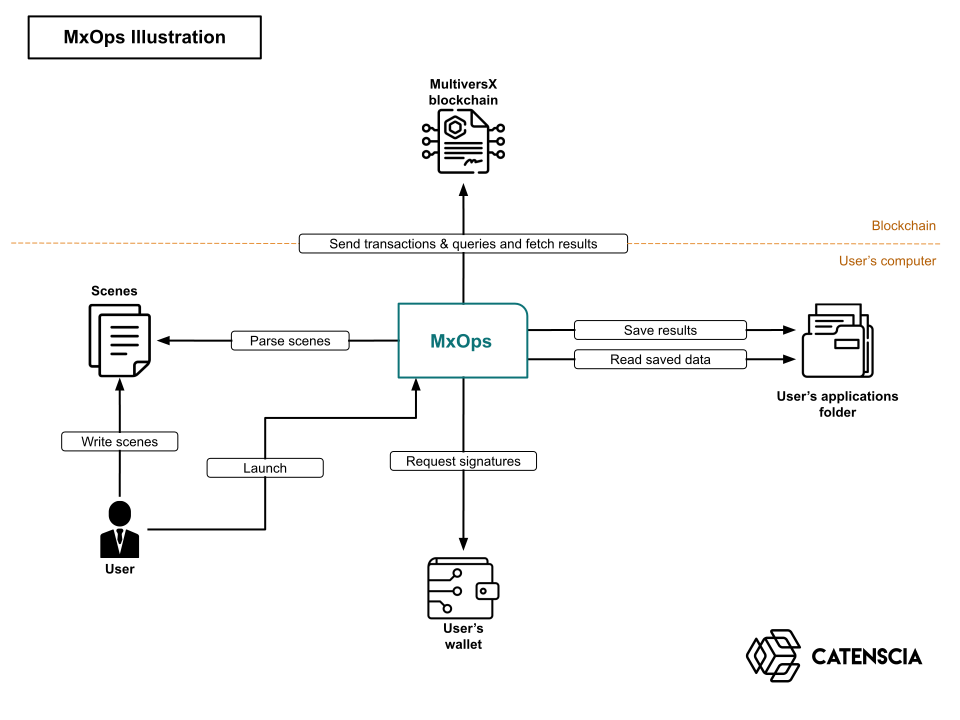
So the only thing you will have to do as a user is to write scenes and tell MxOps to execute them. MxOps will really handle all the complex part for you! The next chapter gives you a broad understanding of the constitution of a scene and how to write them.
Scenes
A scene is a file describing what MxOps has to do. If we translate it in natural language, it would look like the following:
- Name "owner" the wallet located at "./wallets/my_devnet_wallet.pem"
- MxOps will execute these actions in the specified order:
    - Make "owner" deploy a contract from the wasm file at "./contracts/my_contract.wasm".
      Name the newly deployed contract "my-contract".
    - Make "owner" call the endpoint "stake" of the contract "my-contract"
      while sending 0.5 eGLD.
    - Query the staked amount by "owner" on the contract "my-contract"
      and store the result under the key "ownerStakedAmount"
    - Make "owner" call the endpoint "withdraw" of the contract "my-contract"
      while providing the full amount of staked token
Here is the above scene, but this time with the MxOps syntax:
accounts:
  - account_id: owner
    pem_path: ./wallets/my_devnet_wallet.pem

steps:
  - type: ContractDeploy
    sender: owner
    wasm_path: ./contracts/my_contract.wasm
    abi_path: ./contracts/my_contract.abi.json
    contract_id: my-contract
    gas_limit: 50000000
    upgradeable: true
    readable: false
    payable: false
    payable_by_sc: true

  - type: ContractCall
    sender: owner
    contract: my-contract
    endpoint: stake
    gas_limit: 100000000
    value: 50000000000000000  # 0.5 EGLD

  - type: ContractQuery
    contract: my-contract
    endpoint: getStakedAmount
    arguments:
        - "%owner.address"
    results_save_keys:
      - ownerStakedAmount

  - type: ContractCall
    sender: owner
    contract: my-contract
    endpoint: withdraw
    gas_limit: 5000000
    arguments:
      - "%my-contract.ownerStakedAmount"
A lot of information is written here, but you don’t have to worry about the details for now. Just remember that scenes are the core of MxOps and that it tells the program what to do.
To sum up
By creating scenes, simple yaml files, where you tell MxOps what to do on the blockchain, and you can accomplish quite easily many things:
deploy and initialize in a repeatable, testable and robust manner your smart-contracts
tests your smart-contracts on-chain with third party smart-contracts
Interact directly with mainnet smart-contracts without having to rely on a front-end (for example, easily claim all your rewards in one go across all protocols)
Create and run fast and robust integration tests for your smart-contracts
Manage your smart-contracts
create and manage tokens
Automate transactions sequence (example loop borrowing on Hatom)
MxOps was done with flexibility in mind: in addition to all the existing features, you can easily customize it or create additional features tailored to your specific use case!
Next step
You will be guided through the steps of writing a scene in the next chapters. But before that, you need to 🚧 install MxOps! 🚧