Ping Pong
This tutorial will showcase the following topics:
Smart-contract deployment
Smart-contract queries
Smart-contract calls
The entire source code can be find in the MxOps github
Context
We will write MxOps scenes to deploy and interact with the ping-pong contract from the MultiversX tutorial.
Here is the plan:
Deploy the ping-pong contract
Ping some eGLD to the contract
Pong the eGLD back
Nothing fancy there, but this will teach you the strings of MxOps and you will get familiar with this tool 😄
Prerequisites
You will need to have the following installed:
MxOps: installation steps
Rust and sc-meta: installation steps
Git: installation steps
Tutorial plan
Clone the ping-pong contract and build it
Setup your devnet wallet
Deploy the contract
Ping
Pong
Executions
To prepare for the tutorial, create a new folder
mkdir ping_pong_tutorial
cd ping_pong_tutorial
Smart Contract Build
To deploy the ping-pong smart-contract, we need it in wasm format. Let’s retrieve from Github the source code of the ping-pong contract and compile it:
git clone https://github.com/multiversx/mx-ping-pong-sc contract
sc-meta all build
Make sure that the last lines of the output are like this:
Packing ../output/ping-pong.mxsc.json ...
Contract size: 3799 bytes.  # size maybe a bit different depending on the version
The contract is now compiled and ready to be deployed! 📡
Owner Wallet
We will need a wallet to make our tests. The easiest is to use a pem wallet, as it doesn’t require a confirmation when signing transactions.
Create a folder for the mxops scenes and create a setup scene:
mkdir mxops_scenes
touch mxops_scenes/account_setup.yaml
In the scene mxops_scenes/account_setup.yaml, add the following:
steps:

  - type: GenerateWallets
    save_folder: ./wallets
    wallets:
        - owner

  - type: R3D4Faucet
    targets:
      - owner
This will create a pem wallet at wallets/owner.pem and ask the r3d4 faucet for some initial funds.
You can execute this scene on devnet with the command below:
mxops execute -n devnet -s ping_pong_tutorial mxops_scenes/account_setup.yaml
Command results
[2025-04-03 17:26:08,277 INFO] MxOps  Copyright (C) 2025  Catenscia
This program comes with ABSOLUTELY NO WARRANTY [general in main_cli.py:65]
[2025-04-03 17:26:08,278 INFO] Scenario ping_pong_tutorial created for network devnet [data in execution_data.py:864]
[2025-04-03 17:26:08,278 INFO] Executing scene mxops_scenes/setup/account.yaml [execution in scene.py:148]
[2025-04-03 17:26:08,374 INFO] Wallet n°1/1 generated with address erd1kx9fdwj82e7a73ag4xka4haqe2m5p9xcxtdh7sm76hfd4dxdjjescqtacc at wallets/owner.pem [execution in setup.py:84]
[2025-04-03 17:26:08,468 INFO] Requesting 1.0 dEGLD from r3d4 faucet for erd1kx9fdwj82e7a73ag4xka4haqe2m5p9xcxtdh7sm76hfd4dxdjjescqtacc [execution in setup.py:133]
[2025-04-03 17:26:08,545 INFO] Response from faucet: Added to list [execution in setup.py:174]
[2025-04-03 17:26:08,546 INFO] Check the account for funds arrival: https://devnet-explorer.multiversx.com/accounts/erd1kx9fdwj82e7a73ag4xka4haqe2m5p9xcxtdh7sm76hfd4dxdjjescqtacc [execution in setup.py:140]
Note
The r3d4 faucet is heavily used, so it may be empty when you try to claim some EGLD. In this situation, MxOps will give you the following error: mxops.errors.FaucetFailed: Balance is too low. Try again later
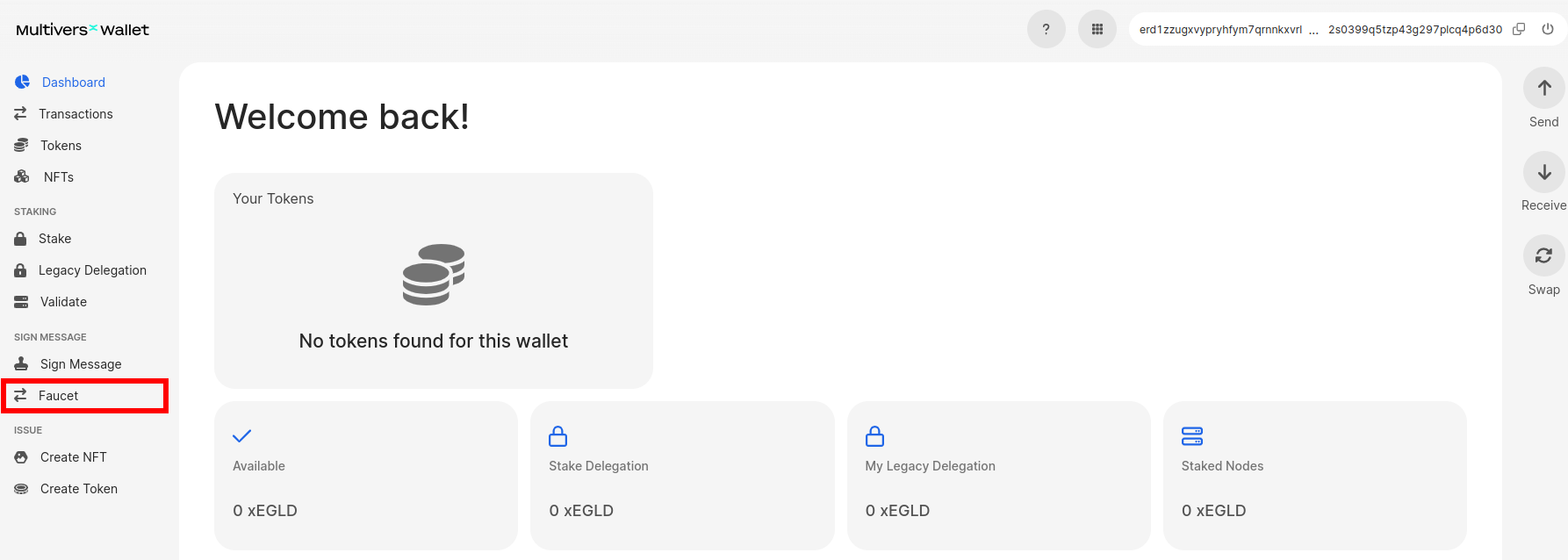
The funds should arrive under a minute but if there is any error, you can manually ask for some funds on the regular faucet on the devnet wallet
Warning
The secret key of the wallet is written in clear in a pem file! It is very useful for tests but unless you know what you are doing, don’t use pem files for mainnet.
Deployment
Everything is in place for us to deploy our ping-pong contract so let’s get to work ⚒️👷♂️
To deploy our contract, we will use a ContractDeploy step while specifying several elements: the path of the wasm file, the wallet that will deploy the contract, the code metadata and lastly the arguments for the initialization of our contract.
The init function of the ping-pong contract take three arguments:
#[init]
fn init(
    &self,
    ping_amount: BigUint,
    duration_in_seconds: u64,
    opt_token_id: OptionalValue<EgldOrEsdtTokenIdentifier>,
)
We don’t want yet to specify the ping amount or the wait time between the ping and the pong transactions. So we will use environment variables (PING_PONG_AMOUNT and PONG_WAIT_TIME), which will allow us specify it at deployment time.
To be able to interact with the deployed contract later on in the scene, we need give the newly deployed contract an id. We will choose egld-ping-pong for our tutorial.
Create the file mxops_scenes\01_deploy.yaml and write the content below
steps:

  - type: ContractDeploy
    sender: owner
    wasm_path: "./contract/ping-pong/output/ping-pong.wasm"
    abi_path: "./contract/ping-pong/output/ping-pong.abi.json"
    contract_id: "egld-ping-pong"
    gas_limit: 40000000
    arguments:
      - "$PING_PONG_AMOUNT"
      - "$PONG_WAIT_TIME"
      - null
    upgradeable: true
    readable: false
    payable: false
    payable_by_sc: true
We provide a null value for the optional token identifier, this will make the contract select EGLD by default.
Note
To tell MxOps that PING_PONG_AMOUNT and PONG_WAIT_TIME are environment variables, we use the $ symbol. Find more about this in the smart-values chapter.
Ping
Let’s say we want to ping our contract, but we don’t remember what was the ping amount to send. So what we will do is first ask the contract for the amount of EGLD we are supposed to send and then send the ping transaction with the correct amount.
Create a new scene, which we will call mxops_scenes\02_ping.yaml:
steps:

  - type: ContractQuery
    contract: "egld-ping-pong"
    endpoint: getPingAmount
    results_save_keys:
      - PingAmount

  - type: ContractCall
    sender: owner
    contract: "egld-ping-pong"
    endpoint: ping
    gas_limit: 3000000
    value: "%egld-ping-pong.PingAmount"
    checks:
      - type: Success

      - type: Transfers
        condition: exact
        expected_transfers:
          - sender: "%owner.address"
            receiver: "%egld-ping-pong.address"
            identifier: EGLD
            amount: "%egld-ping-pong.PingAmount"
Some explanations:
The first step tells MxOps to make a query to our contract, retrieve the ping amount and save it under the key
egld-ping-pong.PingAmountThe second step tells MxOps to execute the ping transaction while sending the current amount of EGLD, this amount is referenced using the smart-values system of MxOps:
%egld-ping-pong.PingAmountLastly, to make sure that everything went alright, we will ask to MxOps to check two things: first that the transaction is a success (which he does by default) and second that the transaction contains exactly the expected transfer of EGLD from us to the ping pong contract
Pong
As we set a wait time of 1 second and a block confirmation time is more than that, we can call the “pong” endpoint immediately after the ping confirmation. Indeed by default, MxOps wait for each transaction to be confirmed before sending the next one. As MultiversX block are 6 seconds long, the wait period for the pong action will be over.
Create the scene mxops_scenes/03_pong.yaml and add the content that is very similar to the ping scene:
steps:

  - type: ContractCall
    sender: owner
    contract: "egld-ping-pong"
    endpoint: pong
    gas_limit: 3000000
    checks:
      - type: Success

      - type: Transfers
        condition: exact
        expected_transfers:
          - sender: "%egld-ping-pong.address"
            receiver: "%owner.address"
            identifier: EGLD
            amount: "%egld-ping-pong.PingAmount"
Here, we will check that the contract indeed send us back the correct amount of EGLD.
Executions
The only thing left to do for us is now to tell MxOps to execute our three scenes: deploy, ping and pong. As we named our scene with numbers (01, 02 and 03), they are already in the correct execution order. So we will just provide to MxOps the folder of the scenes:
export PING_PONG_AMOUNT=100000000000000000  # 0.1 EGLD
export PONG_WAIT_TIME=1  # 1 seconds
mxops execute -n devnet -s ping_pong_tutorial mxops_scenes
Command results
[2025-04-03 17:34:08,526 INFO] MxOps  Copyright (C) 2025  Catenscia
This program comes with ABSOLUTELY NO WARRANTY [general in main_cli.py:65]
[2025-04-03 17:34:08,526 INFO] scenario ping_pong_tutorial loaded for network devnet [data in execution_data.py:836]
[2025-04-03 17:34:08,526 INFO] Executing scene mxops_scenes/setup/03_reload_account.yaml [execution in scene.py:148]
[2025-04-03 17:34:08,612 INFO] Executing scene mxops_scenes/01_deploy.yaml [execution in scene.py:148]
[2025-04-03 17:34:08,617 INFO] Deploying contract egld-ping-pong [execution in smart_contract.py:66]
[2025-04-03 17:34:14,922 INFO] Transaction successful: https://devnet-explorer.multiversx.com/transactions/3df7c35c5c62cc966402f23ee909c717c50a9b31e4c2abaa6cdc044600bbbf52 [execution in base.py:163]
[2025-04-03 17:34:14,923 INFO] The address of the deployed contract egld-ping-pong is erd1qqqqqqqqqqqqqpgqu8afktxyqhlf6naldaa5m93wrr79xnxqjjes4zg9uj [execution in smart_contract.py:121]
[2025-04-03 17:34:14,933 INFO] Executing scene mxops_scenes/02_ping.yaml [execution in scene.py:148]
[2025-04-03 17:34:14,937 INFO] Query getPingAmount on erd1qqqqqqqqqqqqqpgqu8afktxyqhlf6naldaa5m93wrr79xnxqjjes4zg9uj (egld-ping-pong) [execution in smart_contract.py:362]
[2025-04-03 17:34:14,996 INFO] Query results: {
    "PingAmount": 100000000000000000
} [execution in smart_contract.py:390]
[2025-04-03 17:34:15,000 INFO] Calling ping on erd1qqqqqqqqqqqqqpgqu8afktxyqhlf6naldaa5m93wrr79xnxqjjes4zg9uj (egld-ping-pong)  [execution in smart_contract.py:243]
[2025-04-03 17:34:21,212 INFO] Transaction successful: https://devnet-explorer.multiversx.com/transactions/a333ac046f46396bd454f44f73c542a9b52cb62cdd74321656d23fce8231d960 [execution in base.py:163]
[2025-04-03 17:34:21,213 INFO] Executing scene mxops_scenes/03_pong.yaml [execution in scene.py:148]
[2025-04-03 17:34:21,216 INFO] Calling pong on erd1qqqqqqqqqqqqqpgqu8afktxyqhlf6naldaa5m93wrr79xnxqjjes4zg9uj (egld-ping-pong)  [execution in smart_contract.py:243]
[2025-04-03 17:34:27,433 INFO] Transaction successful: https://devnet-explorer.multiversx.com/transactions/ac329ceb5bb7ee83a5c9f822b86ff3ed9fe54c4574f3d588e5abc6908bd10569 [execution in base.py:163]
You should now see MxOps slowly executing the steps, one after the other. It will also give you the explorer links of the transactions so you can inspect the results in more details if you want to.
If you want you can ping again the contract:
mxops execute -n devnet -s ping_pong_tutorial mxops_scenes/02_ping.yaml
and pong it when you feel like it:
mxops execute -n devnet -s ping_pong_tutorial mxops_scenes/03_pong.yaml
Data
If you want to look at the data saved by MxOps in the ping_pong_tutorial scenario, enter the command below:
mxops data get -n devnet -s ping_pong_tutorial
Command results
[2025-04-03 18:17:29,990 INFO] MxOps  Copyright (C) 2025  Catenscia
This program comes with ABSOLUTELY NO WARRANTY [general in main_cli.py:65]
[2025-04-03 18:17:29,990 INFO] scenario ping_pong_tutorial loaded for network devnet [data in execution_data.py:836]
{
    "saved_values": {},
    "name": "ping_pong_tutorial",
    "network": "devnet",
    "creation_time": 1743694363,
    "last_update_time": 1743695540,
    "accounts_data": {
        "erd1kx9fdwj82e7a73ag4xka4haqe2m5p9xcxtdh7sm76hfd4dxdjjescqtacc": {
            "saved_values": {},
            "account_id": "owner",
            "bech32": "erd1kx9fdwj82e7a73ag4xka4haqe2m5p9xcxtdh7sm76hfd4dxdjjescqtacc",
            "pem_path": "wallets/owner.pem",
            "__class__": "PemAccountData"
        },
        "erd1qqqqqqqqqqqqqpgqu8afktxyqhlf6naldaa5m93wrr79xnxqjjes4zg9uj": {
            "saved_values": {
                "PingAmount": 100000000000000000
            },
            "account_id": "egld-ping-pong",
            "bech32": "erd1qqqqqqqqqqqqqpgqu8afktxyqhlf6naldaa5m93wrr79xnxqjjes4zg9uj",
            "code_hash": "26238ec483a1a25edf327f66e028ae8a7dbe48f6fd0a9f708676234d60c90cbc",
            "deploy_time": 1743694454,
            "last_upgrade_time": 1743694454,
            "__class__": "InternalContractData"
        }
    },
    "account_id_to_bech32": {
        "owner": "erd1kx9fdwj82e7a73ag4xka4haqe2m5p9xcxtdh7sm76hfd4dxdjjescqtacc",
        "egld-ping-pong": "erd1qqqqqqqqqqqqqpgqu8afktxyqhlf6naldaa5m93wrr79xnxqjjes4zg9uj"
    },
    "tokens_data": {}
}
🏆 Conclusion
Congratulation, you learned how to deploy and interact with a smart-contract! You even setup some small checks to make sure that the contract was behaving correctly 😄
This will surely come handy for you project! Do not hesitate to give us your feedback on this tutorial 🙌